For your first app
Build your first app with the AI you already have.
You don’t need to be a developer. Describe the app you wish existed; Mouseion, Ion’s app builder, plans it with you and builds it on your own computer. It asks what it can’t work out, shows you a plan to approve before it builds, and uses the Claude or ChatGPT plan you already pay for (its usage limits apply).
Can I build an app if I can’t code?
You can get a long way. The hard parts for a beginner are describing the app clearly, answering the agent’s questions and checking what it built. That is where most people get stuck, not in the code itself. Mouseion plans the app with you first, then builds it on your own computer with a live preview you can open on your phone.
- 01Describe itSay what the app is for and who uses it, in your own words. A photo of a sketch or a link to an app you half like helps too.
- 02Answer its questionsThe planning chat reads what you wrote and asks only what it can’t work out, as options you pick from.
- 03Approve the planIt proposes a plan: the pieces of work, in order, and what “done” means for each. You edit it, then approve it or send it back.
- 04Check the previewEach piece is built on its own branch. Open the preview on your phone, and keep the change or throw it away.
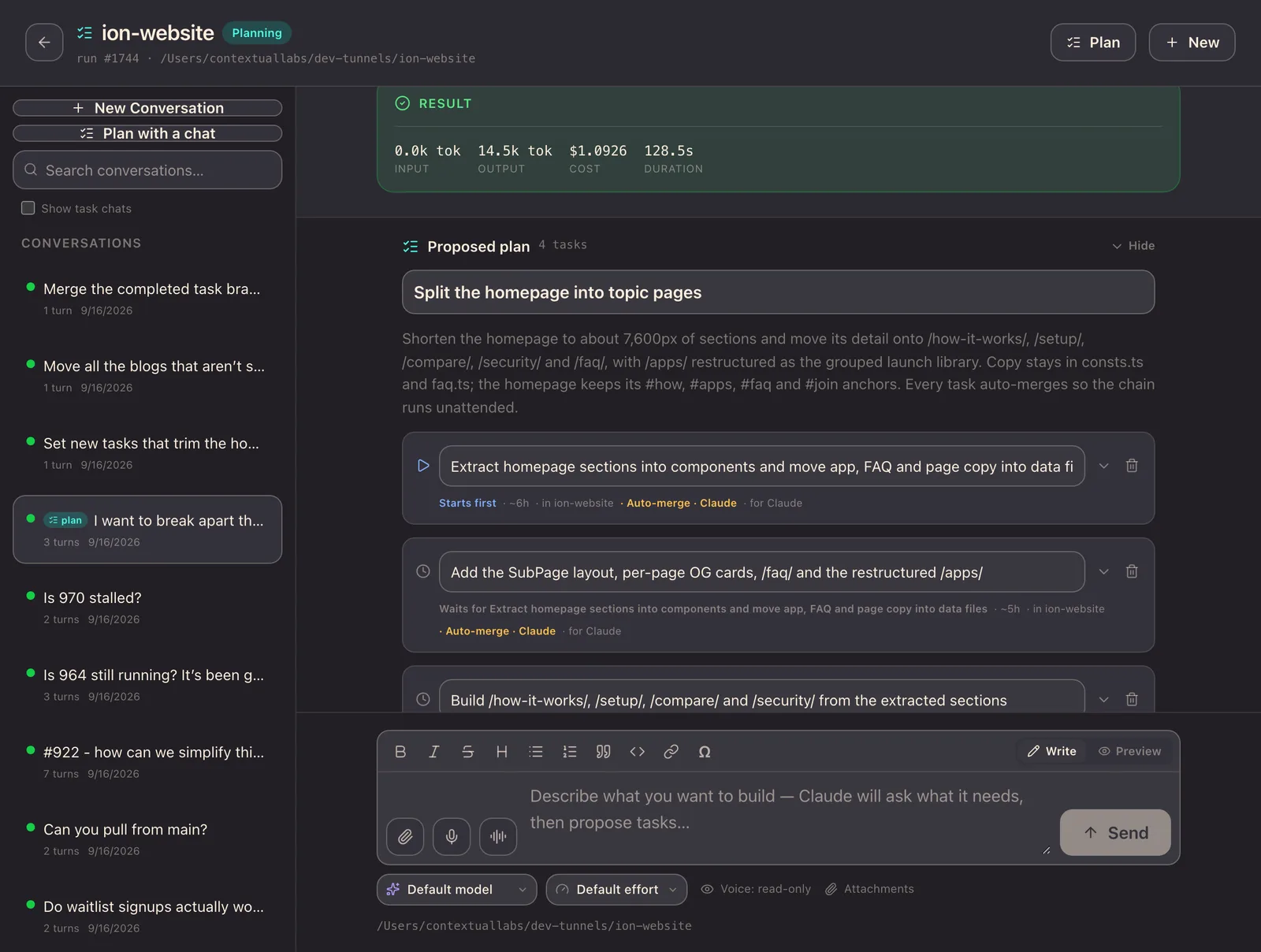
You still do the deciding: what the app is for, whether the plan is right, and whether what it built works. That part doesn’t go away, and it is the part you already know how to do.
What does it cost if I already pay for Claude or ChatGPT?
No builder credits on top. The coding agent your plan already includes does the building: Claude Code with a Claude plan, or Codex with a ChatGPT plan. It runs on your own computer, so there are no builder credits to buy while you try an idea.
- No builder credits. Each change comes out of the plan you already pay for, not a second meter.
- Your plan’s usage limits apply. A long build uses more of them than a small change.
- Early access is free. Pricing hasn’t been announced.
What you need
- A Mac or Linux computer that stays on. dev-hub and the agent run there.
- A Cloudflare account and a domain, for the tunnel. A setup wizard does most of the work.
- A Claude or ChatGPT plan, for Claude Code or Codex.
- macOS with Xcode, if you want to deploy to iPhone, Mac or TestFlight.
How is this different from hosted app builders?
Hosted builders like Lovable, Bolt, Replit and Base44 are the easier start: open a browser tab and begin, with nothing to set up, and your app is online when you publish it. You pay for their plan or credits, on top of any AI plan you have, and the app lives on their cloud.
Mouseion takes the local approach. It runs on your own computer, uses the Claude or ChatGPT plan you already pay for, and keeps the code in a git repository on that computer, so it is yours from the first change. Other local, open-source builders exist too, such as Dyad, which uses your own API keys. What Mouseion adds is the planning step: questions before it builds, and a plan you approve.
| A hosted app builder | Mouseion | |
|---|---|---|
| Getting started | Open a browser tab. Nothing to set up. | A Mac or Linux computer that stays on, and a one-time setup. |
| What you pay for | The builder’s plan or credits, on top of any AI plan. | Your Claude or ChatGPT plan, within its usage limits. |
| Where the app runs | On the builder’s cloud. | On your own computer, with a preview you open on your phone. |
| The code | Varies by builder; many let you export it. | In a git repository on your computer, yours from the start. |
| Before it builds | Varies by builder. | Questions you answer, then a plan you edit and approve. |
What can I build?
Small apps that do one job the way you do it. The best first app is one you would open every week and that no app store sells quite right.
Just for you
- A log for the one thing you track that no app tracks your way
- A reading list that remembers why you saved each book
- A tracker for a hobby, from plants to vinyl
For your household
- A chore rota that rotates itself
- A packing list you reuse for every trip
- A place for the boiler manual, the warranty and the plumber’s number
For your small business
- A booking list for a one-person studio
- A quote builder with your own prices
- A job tracker for a trades business
What these apps look like: Ion’s library at launch is 13 small, open-source apps, each built around one job. They were built with the same tools.
 HabitsStreaks that fill themselves in when another app knows you did it.
 RecipesPlan the week’s meals and send the list to Grocery.
 TasksPersonal lists and shared ones, with due dates from your other apps.
 LedgerInvoices, payouts and expenses, and who still owes you.
 PipelineDeals and follow-ups. Your AI drafts the nudges; nothing is sent without you.
 ForgeA print queue for your 3D printer.
Where it stands
Can I download dev-hub yet?
Mouseion is Ion’s builder, and it runs on dev-hub, the tools Ion’s own apps are built with. If you’re invited. We build Ion with these tools every day. dev-hub has no public release yet: you sign in to download it. Downloads are open to invited accounts for now. The Ion app isn’t on the App Store, and publishing from dev-hub to Ion Apps is being built alongside the catalogue, which hasn’t launched either. The early-access list below is the way to hear when they open up.
Questions about building your first app
How much does it cost to build an app with AI?
It depends on who does the building. An agency or freelancer charges for their time, and a hosted AI builder charges a plan or credits for each change. If you already pay for Claude or ChatGPT, the coding agent in that plan can build on your own computer with no builder credits on top, within the plan’s usage limits. Mouseion, Ion’s builder, works that way, though it isn’t downloadable yet.
Can I build an app with Claude Code if I’ve never coded?
Yes, if you can describe what you want and check what comes back. The hard part is being clear, answering the agent’s questions and testing the result, not typing code. Mouseion runs Claude Code or Codex for you and helps with exactly that: it asks what it can’t work out as options you pick from, proposes a plan you edit and approve, and builds with a live preview you open on your phone.
Is there an app builder that runs on my own computer?
Yes. Local, open-source builders exist, such as Dyad, and you can drive Claude Code or Codex directly. Mouseion, Ion’s builder, takes the same local approach with a planning step: it asks questions before building, proposes a plan you approve, and builds on your computer using your own Claude or ChatGPT plan, with a preview on your phone.
Can I build a custom app for my small business with AI?
Yes, and a small business is often where it pays off most: a quote builder with your prices, a job tracker, a booking list shaped like your week. Describe how the work goes today, answer the questions, and approve the plan. For anything that handles customer data or payments, have someone who reads code review it before you rely on it.
Can I build a personal app just for myself?
Yes. An app made for one person or one household, sometimes called personal software or a home-cooked app, doesn’t need to please a market, so it can be small and exactly right. It runs on your own computer, so there is nothing to publish, and you can keep changing it as your needs change.
Is it safe to build an app with AI if I can’t read the code?
Safe enough for an app you and your household use, with care. Each piece of work runs on its own branch, and nothing lands until you check the preview and merge it. Keep secrets out of what you describe, and before an app handles other people’s data or money, have someone who reads code review it.
Have an app idea? Get your invite.
Invite-only, released in small waves. Free during early access.