Developers

The workshop Ion apps are built in.

Ion and its apps are built with two tools: dev-hub, which runs AI coding agents on a computer you own, and the Ion iOS app, which puts that computer in your pocket.

The loop

You describe the work. The agent builds it, and asks when it needs you.

  1. 01AskDescribe the change, or share a link, photo or file into a project from any app.
  2. 02PlanThe agent asks what it can’t work out, then proposes tasks you edit and approve.
  3. 03RunEach task runs on its own branch in its own checkout, several at once.
  4. 04UnblockA question from the agent reaches your phone or watch; you answer it there.
  5. 05ReviewOpen the preview URL, read the summary, merge or discard the branch.
  6. 06ShipMerging to main can fire a deploy: to an iPhone, a Mac, TestFlight, or your own command.

dev-hub

The engine on your own machine.

dev-hub runs on a Mac or Linux computer that stays on. It holds your projects, their git repositories, a task board and your secrets, and it runs the agents — Claude Code or Codex, signed in with your own account. Your devices reach it over a private Cloudflare Tunnel with Cloudflare Access in front, so no ports are opened and your code stays on your machine.

A task board the agent works from

  • Tasks, subtasks and dependencies, with statuses from backlog through review, merging and done. A task that waits on others moves itself along when they finish.
  • Every task has a Markdown spec — the thing the agent is actually handed — plus attachments, the questions asked about it, and a summary of what the run did.
  • Search across titles, specs and decisions, including semantic search, and a knowledge base the agent reads before it starts and writes to when it learns something.
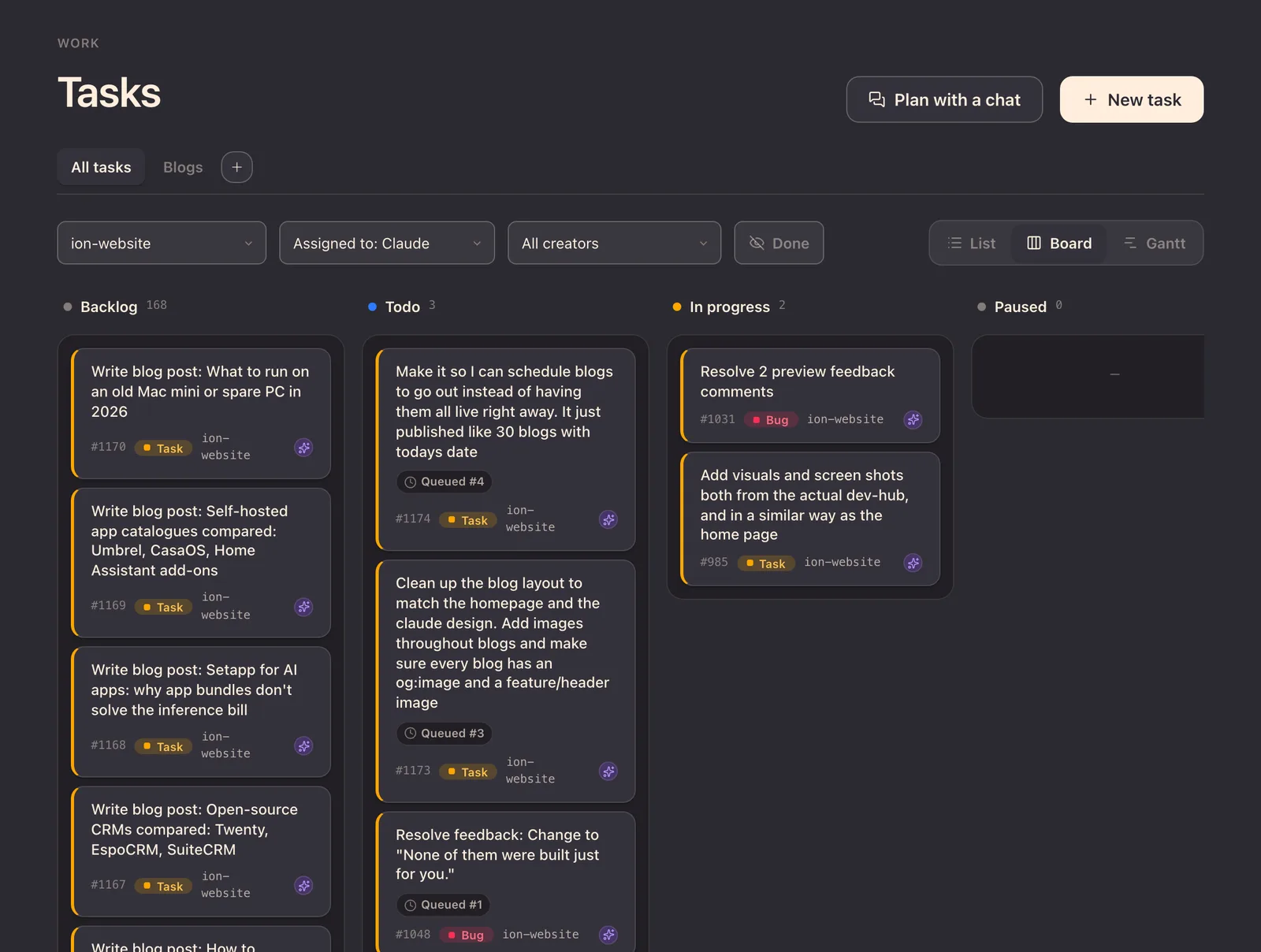
The dev-hub task board for this website, filtered to tasks assigned to Claude: blog posts waiting in Backlog, three queued tasks in Todo, and two tasks In progress, one of them adding these screenshots.
The board this page was built from. The card in progress on the right is the one that added these screenshots.

Agents that run while you don’t

  • A task assigned to the agent and moved to todo is picked up by a background runner. Up to three run at once.
  • Each run gets its own git worktree on its own branch, so parallel agents never collide and nothing reaches main until you merge it.
  • When the agent hits a question only you can answer, the task pauses in needs your input rather than guessing, and picks up again when you reply.
  • Watch a run’s transcript live, stop it at any time, and merge or discard the branch when it lands in review. If a merge conflicts, the agent can be asked to resolve it.
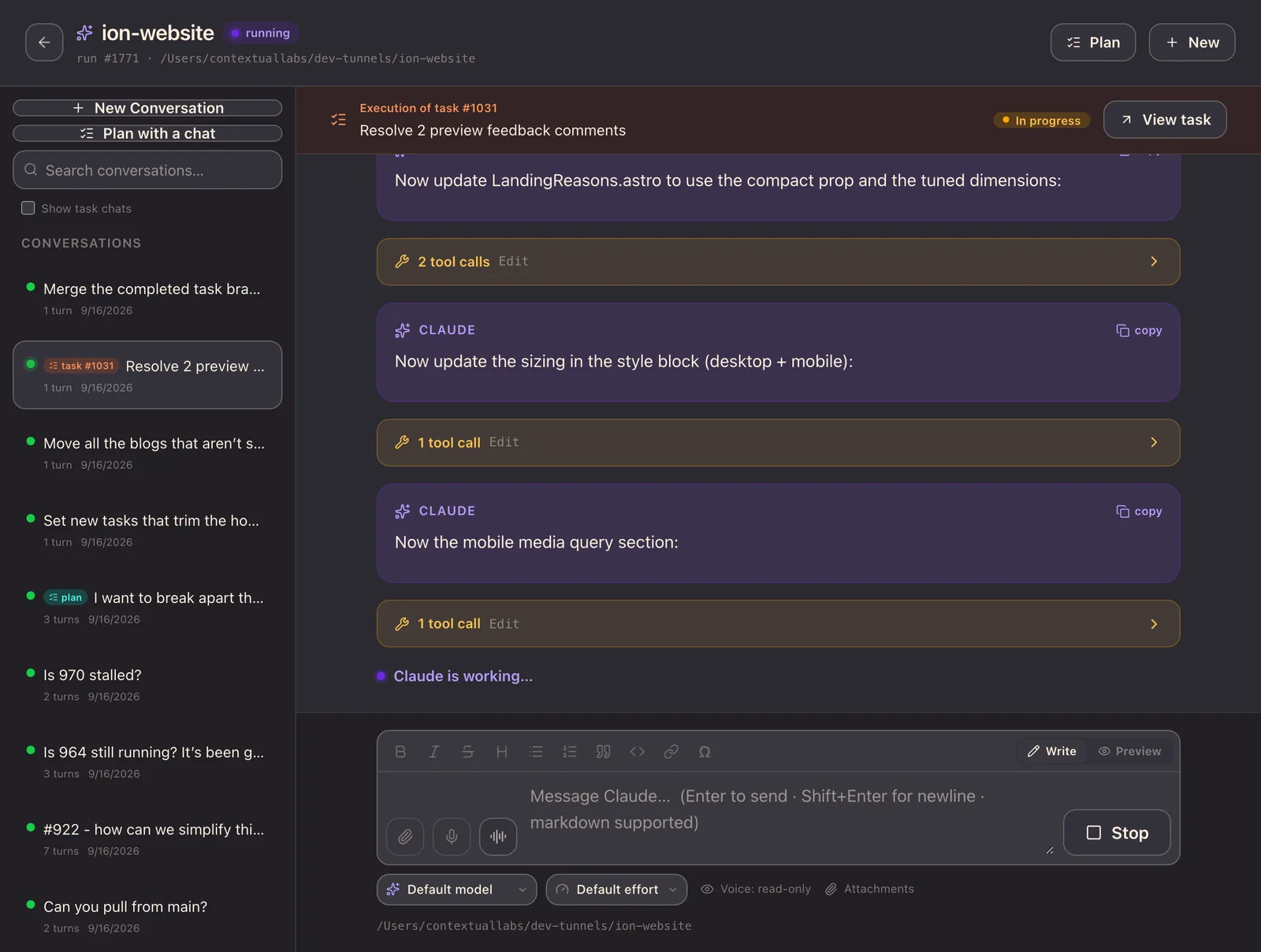
A live agent run in dev-hub: the execution of task #1031, “Resolve 2 preview feedback comments”, marked in progress, with Claude’s messages between collapsed tool calls, “Claude is working…”, and a Stop button.
A run in progress, streamed live: what the agent says, the tools it calls, and a Stop button.

Planning before building

  • A planning chat doesn’t write code. It reads the project and asks what it can’t work out as options you pick from.
  • It proposes a plan: linked tasks with dependencies and completion criteria.
  • You edit the plan, then approve it to start the work, file it in the backlog, or send it back for another pass.
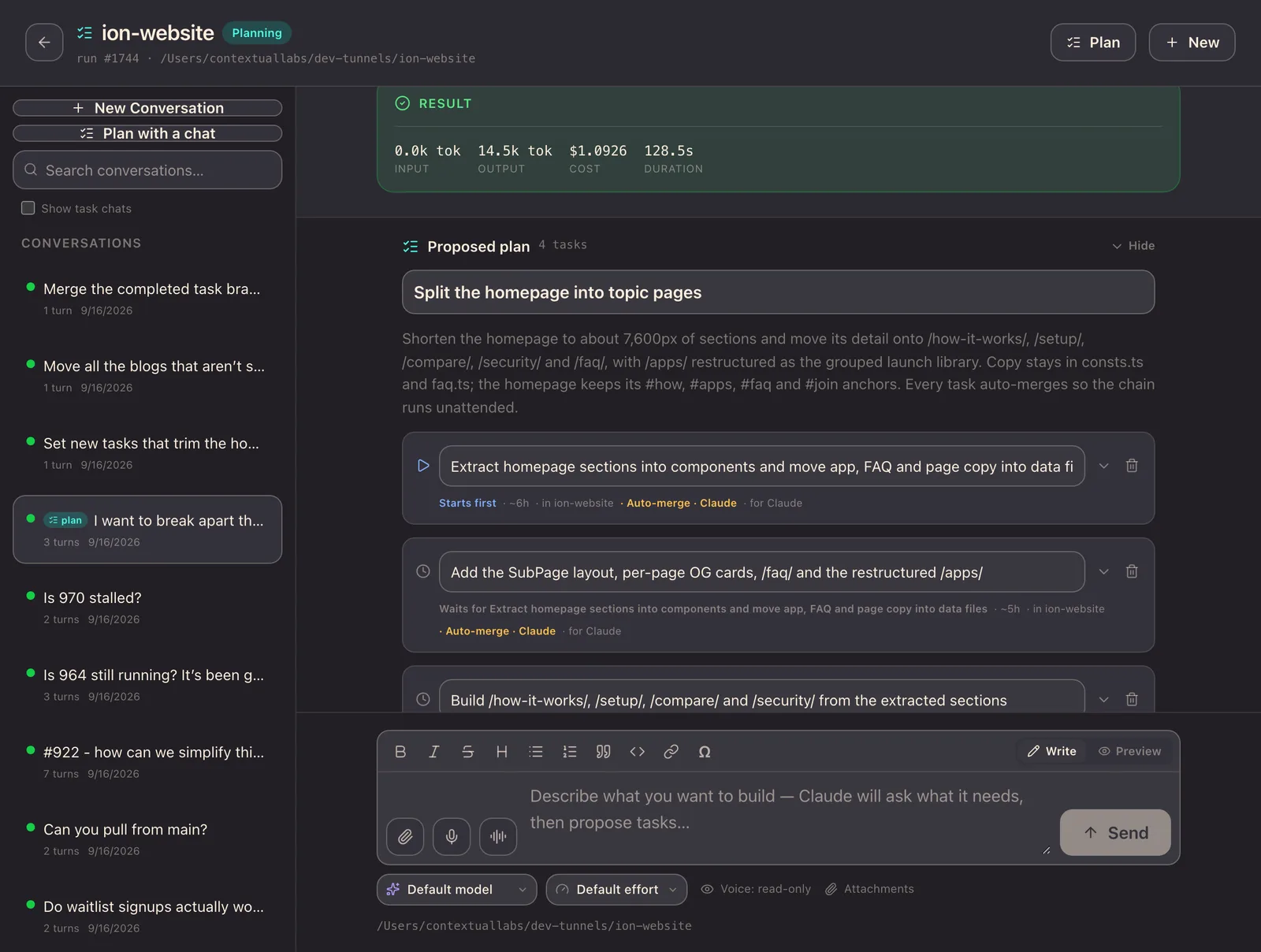
A planning chat in dev-hub proposing a four-task plan called “Split the homepage into topic pages”, the first task starting straight away and the next waiting on it, each set to auto-merge, above a message box that reads “Describe what you want to build”.
The plan that split this site’s homepage into topic pages: linked tasks, each waiting on the one before.

Previews and deploys

  • Start and stop each project’s dev server, and every project gets its own HTTPS URL through the tunnel, so you can look at what the agent built from your phone.
  • A preview view where you pin comments to the exact element on the page; the comments travel with the task into the agent’s prompt.
  • Deploy targets per project — an iPhone or Apple Watch over Wi-Fi, a Mac, TestFlight, an over-the-air install link, or a command of your own — each with its log and an option to fire on every merge to main.
  • App Store preparation checks a release’s copy and screenshots against Apple’s rules and builds the package for App Store Connect. Submitting for review stays your decision.
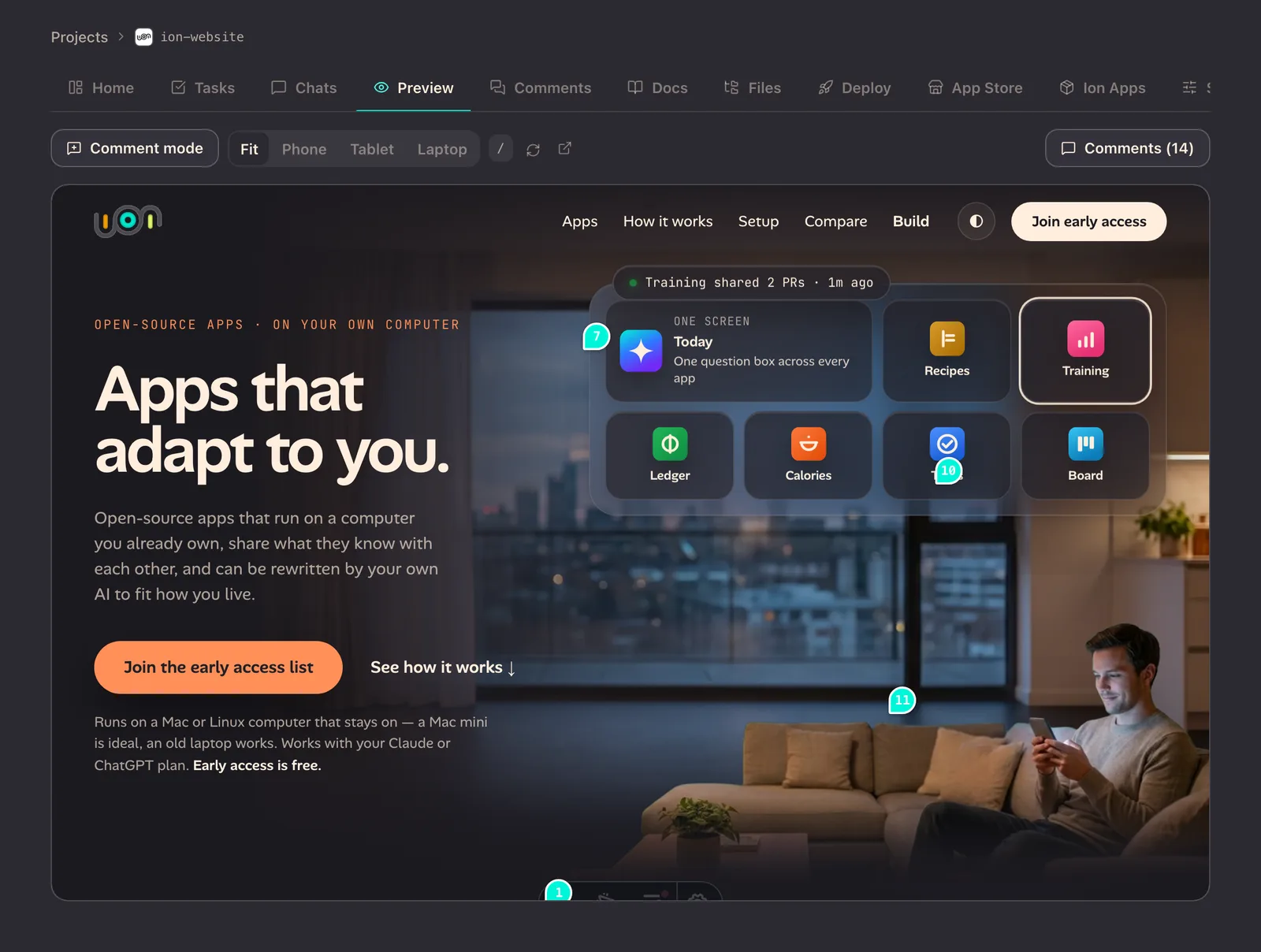
The dev-hub Preview tab showing the Ion homepage running from its dev server, with numbered comment pins placed on elements of the page, Fit, Phone, Tablet and Laptop sizes, and a Comments (14) button.
This site’s homepage in the preview, with comments pinned to the elements they are about.

The plumbing

  • Environment variables shared globally or per project, and an encrypted vault for secrets.
  • A web dashboard, for when you are at a desk.
  • Linked projects: an agent can read another project’s tasks, specs and notes, without seeing its code.
  • Several isolated hubs on one machine, each with its own database, vault and hostname.
  • A doctor command that checks the machine is ready and names the fix when it isn’t.

The Ion iOS app

dev-hub in your pocket.

The app is the control surface for dev-hub. It runs on iPhone, iPad, Mac and Vision Pro, with a separate Apple Watch app. The phone isn’t where you type code; it’s where you approve a plan, answer a question and tap merge — the moments that actually hold work up.

  • Projects and chatThe task board, task detail and the agent chat, streamed live, with model, effort and permission settings for each project.
  • Needs AttentionOne list of everything waiting on you across every project. A tray on the iPhone, the first card on the watch, a home-screen widget and a watch-face complication.
  • A watch app of its ownIt talks to dev-hub directly: projects, questions, tasks and chat, with dictation.
  • PairingType the hub’s address, scan a QR code from dev-hub, or pick a hub found on your network.
  • Share sheetA link, photo or document from any app becomes a task in the project you choose.
  • Browser and debug bundlesConsole, network and DOM panels, and debug bundles exported with secrets redacted, ready to hand to the agent.
  • Screen recordingA timeline editor for zooms, taps and gestures, exported as MP4.

What it takes

  • A Mac or Linux computer that stays on. dev-hub and the agent run there.
  • A Cloudflare account and a domain, for the tunnel. A setup wizard does most of the work.
  • A Claude or ChatGPT plan, for Claude Code or Codex.
  • macOS with Xcode, if you want to deploy to iPhone, Mac or TestFlight.

Where it stands

Not available to download yet.

We build Ion with these tools every day. dev-hub has no public release, and the Ion app isn’t on the App Store. Publishing from dev-hub to Ion Apps is being built alongside the catalogue, which hasn’t launched either. The early-access list below is the way to hear when they open up.

See the Ion apps →

Get early access.

Invite-only, released in small waves. Free during early access.

Get early access.

Invite-only, released in small waves. Free during early access.