OpenClaw vs Claude Code vs Codex for personal automation
OpenClaw is a chat-first agent that lives in your messaging apps. Claude Code and Codex are coding agents that also run everyday tasks. A fair comparison of where each runs, billing, security and memory.
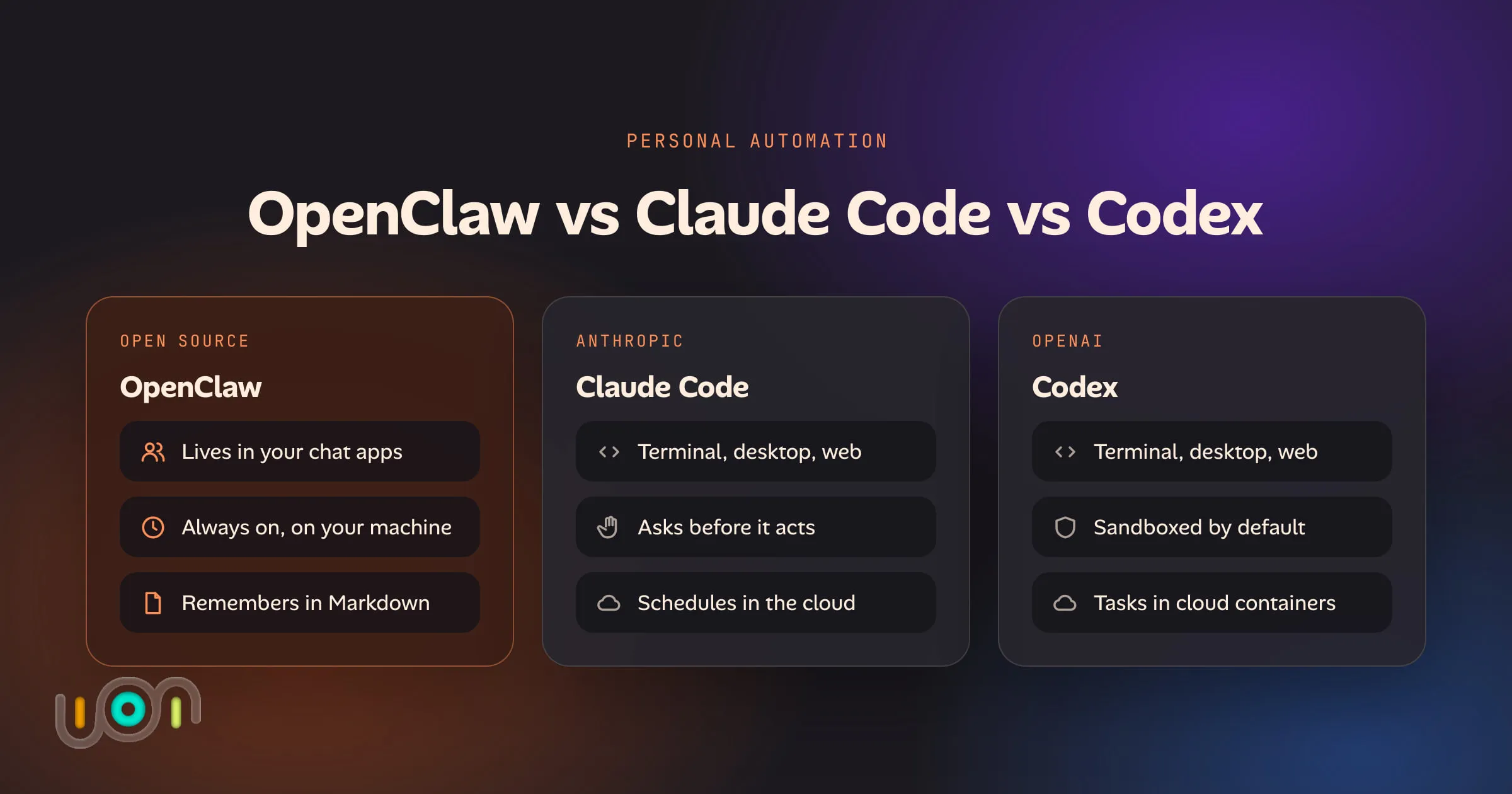
These three get compared constantly, and they are not really the same kind of thing. OpenClaw is an assistant you text. Claude Code and Codex are coding agents, made by Anthropic and OpenAI, that turn out to be good at plenty of work that isn’t code. All three can read files, run commands and work on a schedule on a computer you own, which is why people shopping for “an agent that does things for me” end up choosing between them.
This is the comparison I’d give a friend deciding what to set up this weekend. Everything below was checked against each project’s own documentation on 4 October 2026. This area changes monthly, so check the linked pages before you rely on a detail.
The short answer
- Pick OpenClaw if you want to message an assistant from your phone, have it remember you, and have it act on its own through the day.
- Pick Claude Code or Codex if what you want automated lives in files, scripts and repositories, and you want tighter control over each action.
- Pick between Claude Code and Codex mostly by which plan you already pay for. They are closer to each other than either is to OpenClaw.
| OpenClaw | Claude Code | Codex | |
|---|---|---|---|
| What it is | Open-source (MIT) gateway between your chat apps and a model you choose | Anthropic’s coding agent | OpenAI’s coding agent |
| Where it runs | A computer you keep on: macOS, Linux or Windows | Terminal, editor, desktop app; or Anthropic’s cloud from the web and phone | Terminal, editor, desktop app; or OpenAI’s cloud |
| How you reach it | WhatsApp, Telegram, iMessage, Signal, Slack, Discord and more | At the keyboard, or from your phone through Remote Control and the Claude app | At the keyboard, or from ChatGPT on the web and phone |
| What it can touch | Shell, browser, files, scheduled jobs and paired phones, on the host unless you sandbox it | The project folder and shell on your machine, plus anything you connect with MCP | The project folder and shell on your machine; an isolated container in the cloud |
| How it’s billed | Your own model access: an API key, a ChatGPT or Claude sign-in, or a local model | A Claude plan, or an API key | Included in ChatGPT plans, or an API key |
| Security model | One trusted operator. Pairing codes for unknown senders. Sandbox off by default | Asks before edits and commands. Optional OS sandbox for shell commands | OS sandbox on by default, network off, asks to go further |
| Memory | Markdown files it writes and searches: long-term, daily notes | CLAUDE.md you write, plus notes it keeps per project |
AGENTS.md you write, plus optional local memories |
| Best at | Being reachable, proactive and personal | Long, careful work in files and code | Contained, delegated tasks |
Where each one runs
OpenClaw describes itself as “your AI assistant, on your own hardware, in every chat app you already use.” You install a gateway on a machine that stays on, connect the channels you want, and talk to it where you already talk to people. That always-on machine is the reason so many people bought a Mac mini for it. If that’s you, the Oikou blog has a separate list of what else is worth running on that Mac mini.
Claude Code started in the terminal and now also runs in VS Code and JetBrains editors, a desktop app and the browser. Local sessions work on your machine against your real files. Cloud sessions run on Anthropic’s infrastructure against a repository, and keep going when your laptop is closed. Scheduled work comes in both forms: routines run in the cloud, and desktop scheduled tasks run on your machine.
Codex has the same shape: a CLI, an editor extension, a desktop app and cloud tasks that run in containers OpenAI manages. Scheduled tasks from the desktop app run locally, so the computer has to be on with the app open. Scheduled tasks from the web run in the cloud.
The real difference is the front door. OpenClaw’s is a chat thread on your phone. The other two are built around a session at a keyboard, with phone access added on. Claude Code has narrowed the distance: Remote Control drives a local session from the Claude app, and channels, a research preview, forward Telegram, Discord and iMessage messages into a session that’s already running. That last point matters. A channel only delivers while the session is open, so you keep one alive in a background terminal. OpenClaw is a service designed to be up all the time.
What each one can touch
All three can run shell commands and read and write files, which covers most of what “personal automation” means in practice: rename the scans, total the receipts, pull the CSV from the bank export, draft the email, run the backup script.
OpenClaw adds the pieces a personal assistant needs: a browser it can drive, scheduled jobs, skills that teach it repeatable procedures, and paired iOS and Android devices. By default those tools run on the host itself.
Claude Code and Codex start from a project folder. Each can go further when you connect tools through MCP, the open protocol both support, which is how people give them a calendar, a notes app or a home automation hub. Their cloud sessions see a repository and nothing else on your computer, which is safer and also less useful for household jobs that live on your disk.
How each one is billed
This is the row people get wrong, because it changed four times in 2026.
Codex is the simple one. It is included in ChatGPT plans, from Free through Plus and Pro to the business tiers, with usage limits that grow with the plan. Local and cloud work draw from the same allowance. An OpenAI API key is the alternative, mainly for shared automation.
Claude Code works with a Claude subscription or an Anthropic Console account billed by usage. On a subscription, what you do in Claude Code counts against the plan’s limits.
OpenClaw has no model of its own, so it bills nothing. You bring access, and there are three ways to do that:
- An API key from Anthropic, OpenAI or another provider. You pay per token. This is predictable in principle and can be expensive for an agent that’s awake all day.
- A ChatGPT sign-in. OpenClaw’s OpenAI provider page says OpenAI explicitly supports subscription sign-in in external tools and workflows like OpenClaw.
- A Claude sign-in, which is where the history is.
What Anthropic changed in 2026, and where it stands
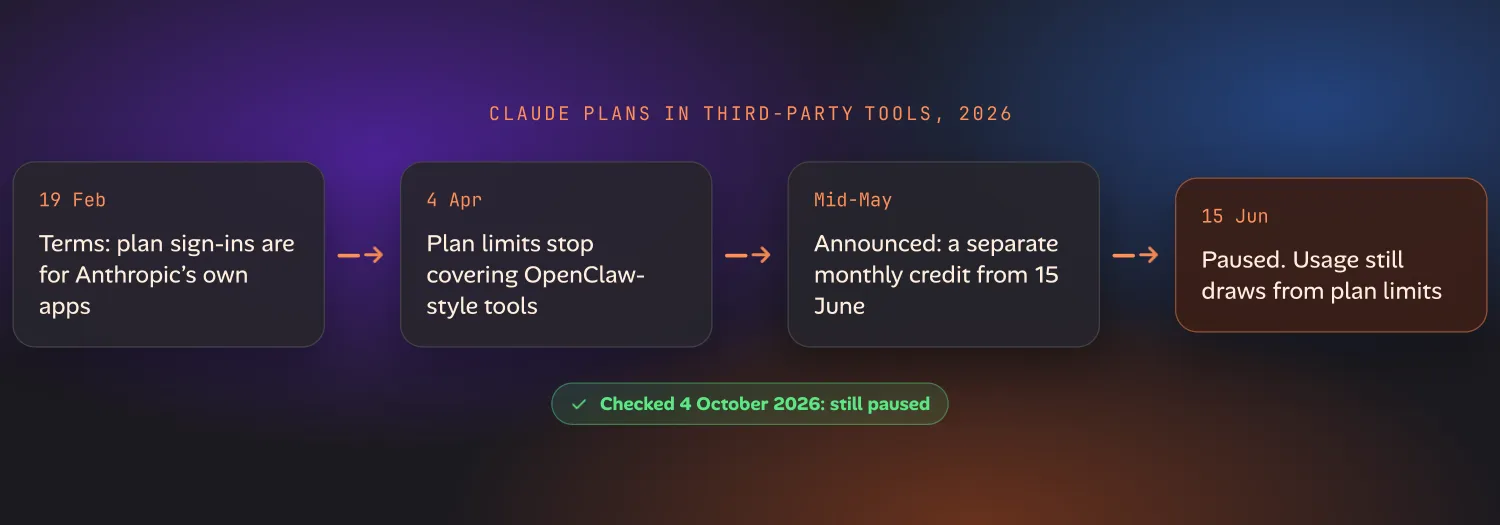
- 19 February. Anthropic updated its legal documentation to say that sign-in tokens from Free, Pro and Max accounts were for Claude Code and Claude.ai, and that using them in any other product or tool broke the consumer terms. The Register covered the clarification.
- 4 April. Enforcement followed. Pro and Max limits stopped covering third-party harnesses, starting with OpenClaw. To keep using Claude there you paid separately, through pay-as-you-go “extra usage” or an API key. Anthropic’s stated reason was that plans weren’t priced for the load these tools generate.
- Mid-May. Anthropic announced a middle path for 15 June: third-party apps, the Agent SDK and
claude -pwould be allowed on a plan again, but would draw from a separate monthly credit (reported as $20 on Pro, $100 and $200 on the two Max tiers) and not from the plan’s ordinary limits. - 15 June. On the day it was due, Anthropic paused it. Its help centre article, Use the Claude Agent SDK with your Claude plan, now opens: “For now, nothing has changed: Claude Agent SDK,
claude -p, and third-party app usage still draw from your subscription’s usage limits.” The credit is not available, and Anthropic says it will share an update before anything takes effect.
Where that leaves you on 4 October 2026: the pause is still in place. OpenClaw’s Anthropic provider page describes the current route as reusing a Claude Code sign-in on the same machine. Claude Code owns the login, OpenClaw doesn’t store it, and the usage counts against your plan. The same page recommends an API key for shared or production automation.
None of this touches Claude Code itself or Codex itself. Using a first-party agent with its own maker’s plan was never in question. That’s the case Oikou is in too, and Oikou’s FAQ has the one-line answer on whether that’s within Anthropic’s and OpenAI’s terms.
The security model
The three make different bets, and this is the row to read slowly if the agent will be near anything you care about.
Codex is the most locked down by default. Locally it runs commands inside a sandbox the operating system enforces (Seatbelt on macOS, bubblewrap and seccomp on Linux), limited to the workspace, with network access off. It has to ask before it reaches outside. Cloud tasks run in isolated containers, offline during the agent phase unless you allow internet access.
Claude Code defaults to asking. Out of the box it requests permission before it edits a file or runs a command, and you loosen that per tool or per mode as you come to trust a workflow. It has an operating-system sandbox for shell commands as well, built on the same primitives, but it is off until you turn it on with /sandbox. Asking is safe, and it’s also the reason an unattended session stalls until someone answers. People fix that by skipping permissions entirely, which throws away the safety.
OpenClaw trusts its operator and has the most to guard. Its security documentation is frank about the model: one trust boundary per gateway, meaning a single operator or people who trust each other. The defaults are sensible. The gateway binds to the local machine, and an unknown sender gets a pairing code, not an answer. But sandboxing is off by default, so tools run on the host until you enable a Docker or similar backend. And an agent that reads incoming messages, web pages and email is reading text written by strangers. OpenClaw’s own advice is to assume the model can be manipulated and to limit the blast radius.
That exposure comes with the job, and it isn’t a flaw unique to OpenClaw. Any agent that is reachable from outside and able to act has it. A coding agent working in one repository reads far less untrusted text.
If you run OpenClaw, turn the sandbox on, run openclaw security audit, give it its own user account or its own machine, and keep it away from folders it has no reason to read.
Memory
All three remember the same way underneath: plain text files that get loaded or searched at the start of a session. What differs is what the memory is about.
- OpenClaw keeps Markdown in its workspace:
MEMORY.mdfor durable facts, a dated file of daily notes, and optional files for your preferences. With an embedding provider configured it searches them by meaning as well as by keyword, and a background process promotes what matters into long-term memory. Its memory documentation puts it plainly: the model only remembers what gets saved to disk. It’s memory about you. - Claude Code has
CLAUDE.md, instructions you write, and auto memory, notes it writes itself from your corrections. Auto memory is on by default for local sessions, stored per repository on your machine, and you can read and edit it as Markdown. It’s memory about a project. - Codex has
AGENTS.md, the cross-tool convention for project instructions, and a local memories feature that summarises past sessions. Memories are off by default.
For personal automation OpenClaw’s is the right shape: it will still know next month that you’re vegetarian. The coding agents remember how a repository works, so for household tasks you end up building a folder of notes and a CLAUDE.md or AGENTS.md that describes it. That works better than it sounds, but you’re assembling by hand what OpenClaw ships with.
What each is best at
OpenClaw is best at presence. A morning summary that arrives before you ask, a reminder that knows the context, a question from the supermarket answered in the chat app you already had open. Nothing else here is as reachable.
Claude Code is best at long, careful work on real files: a pile of documents to reorganise, a script to write and then run every Monday, a broken setup to diagnose. It’s also the one I’d hand a job that needs judgement over several hours. If you want to supervise that from your phone, Remote Control is the place to start.
Codex is best at contained delegation. Hand a task to a cloud container or a sandboxed local run, come back to a result, and know it could not have wandered. If you already have a ChatGPT plan, it costs nothing extra to try.
They aren’t exclusive. Nothing stops you running OpenClaw as the front door and keeping a coding agent on the same machine for work that deserves a proper session.
The gap all three share
Ask any of them “how much protein did I eat this week?” and you get the same thing: a guess from conversation history, or from a note the agent wrote to itself. None of them has a food log to look up.
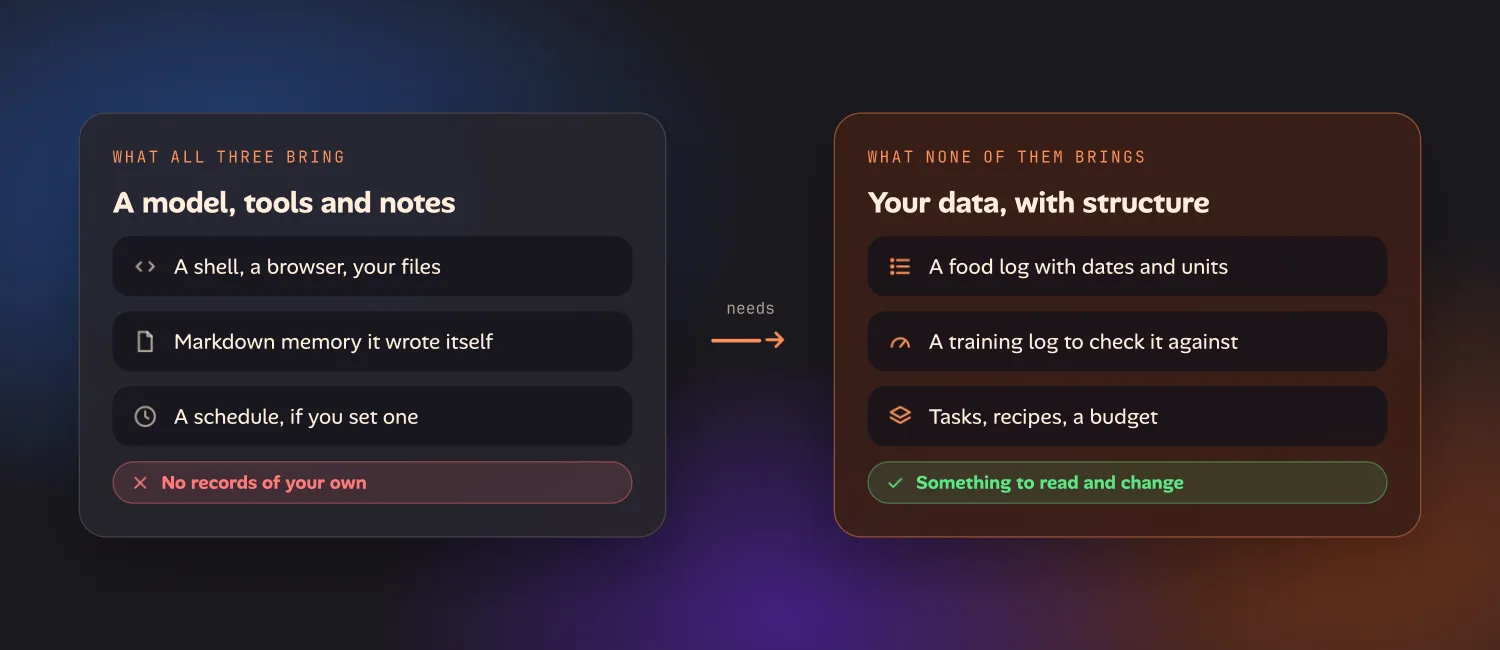
All three arrive with a model, a set of tools and Markdown notes. None arrives with structured data of your own: entries with dates and units, in a place where you can see them, correct them and add to them without going through a chat. A transcript is not a database, and agent-written notes are a poor stand-in for one. The comparison above settles how your agent runs. This settles how good its answers can be, and it’s the same for all three.
You can close the gap yourself. Self-hosted apps such as Mealie, wger and Vikunja keep real records on your own machine, and each has an API an agent can be pointed at.
Oikou’s apps are built for this. They are real apps (lists, logs, budgets) on your own computer that your AI can see and change, using the Claude or ChatGPT plan you already have, whose usage limits apply. If you already run an agent on one, Oikou gives it real apps to work with. Oikou’s compare page covers how that differs from a chat agent.
Which should you pick
- You want to text an assistant and have it text you first: OpenClaw, on a machine you can leave on, with the sandbox enabled.
- You want a capable agent for files, scripts and occasional big jobs, and you have a Claude plan: Claude Code.
- You have a ChatGPT plan and want strong defaults with little setup: Codex.
- You want an agent to help run a household: any of the three, plus somewhere your data actually lives.
Questions
OpenClaw vs Claude Code: which should I use for personal automation?
Use OpenClaw if you want an assistant you message from WhatsApp, Telegram or iMessage that stays on all day on a computer you own. Use Claude Code if most of what you want automated lives in files, scripts and repositories, and you would rather it asked before it acts. Plenty of people run both. Neither comes with records of your own to work on, such as a food log or a task list, so the results depend on what data you give it.
What is the difference between OpenClaw and Codex?
OpenClaw is an open-source gateway you host yourself that connects your chat apps to a model of your choice and keeps running in the background. Codex is OpenAI's own coding agent, included with ChatGPT plans, that runs in a terminal, an editor, a desktop app or OpenAI's cloud. Codex runs local commands in a sandbox with network access off by default. OpenClaw's sandbox is something you turn on.
Can I use my Claude subscription with OpenClaw?
As of 4 October 2026, yes, through OpenClaw's reuse of a Claude Code sign-in on the same machine, and the usage counts against your plan's limits. Anthropic restricted this between February and April 2026, announced a separate monthly credit for it in May, and paused that change on 15 June 2026, saying it would give notice before anything changes. An Anthropic API key, billed by usage, is the option that has been allowed throughout.
Can I use my ChatGPT plan with OpenClaw?
Yes. OpenClaw supports signing in with a ChatGPT account through Codex sign-in, and its documentation says OpenAI explicitly supports subscription sign-in in external tools like OpenClaw. Usage counts against your ChatGPT plan's limits. An OpenAI API key is the pay-as-you-go alternative.
Is OpenClaw safe to run on my main computer?
It can be, with care. OpenClaw's own guidance is to assume the model can be manipulated and to limit what it can reach. Its sandbox for tool execution is off by default, so turn it on, keep the gateway bound to your own machine, pair only your own accounts, run its security audit command, and consider a dedicated user account or a separate machine for it.