Run Claude Code 24/7 on a Mac mini at home
A concrete setup for an always-on Claude Code machine: power settings, tmux or launchd, Tailscale instead of open ports, where the token lives, usage limits and a queue of work.
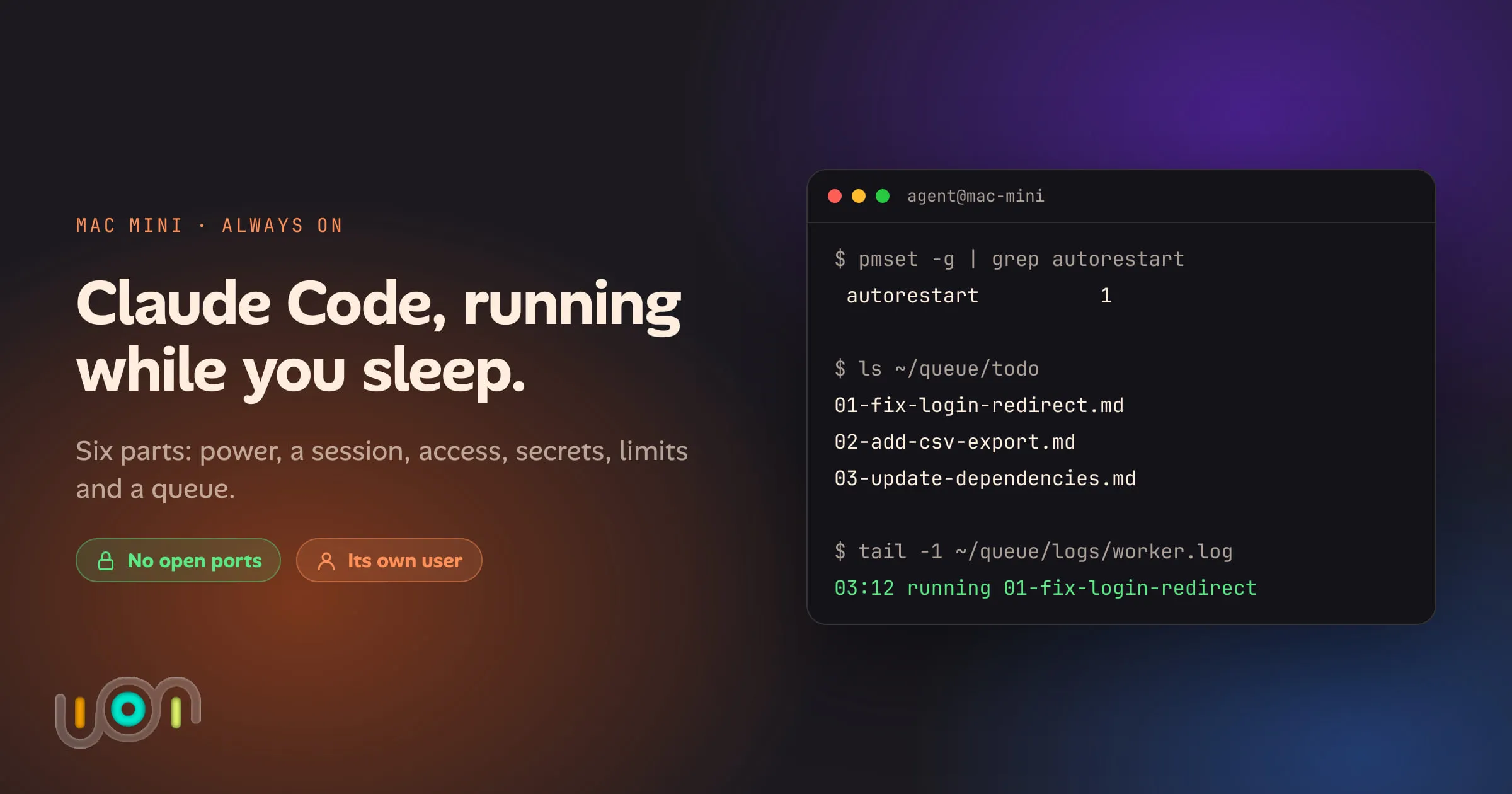
A Mac mini is a good home for a coding agent. It’s quiet, it uses little power, and it’s happy to sit on a shelf for months. What it doesn’t do out of the box is keep Claude Code working while you’re asleep. The Mac goes to sleep, the SSH session drops and takes the agent with it, a power cut leaves the machine off, and an agent that has finished its task waits for you to come back and type the next one.
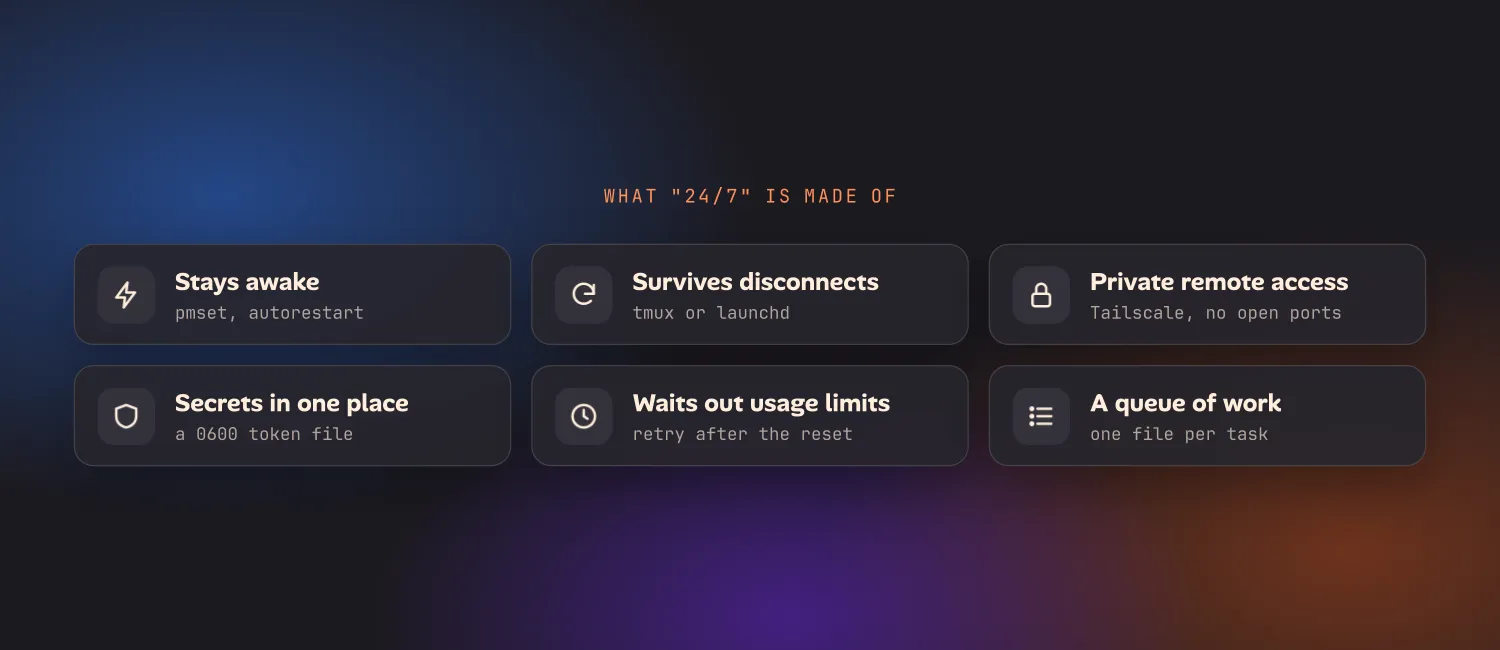
“24/7” is really six separate problems. This post goes through each one with the exact settings and commands, then the security cautions, then what this setup still doesn’t give you.
The short answer
| Part | What to use | The catch |
|---|---|---|
| Stays awake | Energy settings, or pmset |
FileVault changes what happens after a power cut |
| Survives disconnects | tmux for a session, launchd for a service | tmux doesn’t survive a reboot |
| Remote access | Tailscale or Cloudflare Tunnel | One more thing to keep signed in |
| Secrets | A long-lived token in a file only the agent’s user can read | It’s valid for a year, so treat it like a password |
| Usage limits | Wait for the reset, then run the task again | Nothing resumes by itself |
| A queue of work | A folder of task files and a loop | You are now maintaining a small scheduler |
Before you build it: the options that need less
Two things from Anthropic cover part of this, and you should rule them out first.
Remote Control links a Claude Code session running on your machine to claude.ai/code and the Claude phone app. Run claude remote-control on the Mac mini and you can start and steer sessions from your phone with no SSH and no inbound connection. With --spawn worktree, each session you start gets its own git worktree. If what you want is “my Mac mini does the work and I talk to it from the couch”, this is most of it, and it’s less to maintain than anything below. It still needs the Mac awake and the process alive, so the next two sections apply either way.
Claude Code on the web runs sessions on Anthropic’s machines instead of yours. If the work is all in a GitHub repository and needs nothing on your network, you may not need a home machine at all.
The rest of this post is for the case those two don’t cover: unattended runs, on your own hardware, working through a list while nobody is watching.
Keep the Mac mini awake and coming back
In System Settings, open Energy and turn on:
- Prevent automatic sleeping when the display is off
- Start up automatically after a power failure
- Wake for network access
The same thing from a terminal:
sudo pmset -a sleep 0 disksleep 0 womp 1 autorestart 1
pmset -g    # check: sleep 0, autorestart 1
sleep 0 stops the system sleeping, and autorestart 1 powers the Mac back on when electricity returns. Let the display sleep; that costs nothing. You’ll see caffeinate recommended for this as well. It holds the Mac awake only while that one command is running, which suits a single long job but not a machine that should stay up.
Give the Mac mini a reserved address in your router while you’re there, and plug it in with Ethernet if you can.
Keep the session alive: tmux or launchd
These solve different problems, and most setups end up with both.
tmux, for a session you come back to
A Claude Code session started in a plain SSH shell ends when the connection does. Inside tmux it keeps going:
brew install tmux
tmux new -A -s claude     # create the session, or attach if it exists
claude                    # or: claude remote-control
# detach with Ctrl-b d; the session keeps running
tmux attach -t claude     # later, from any SSH connection
That’s all tmux does here, and it does it well. The limits are that a tmux session is gone after a reboot, and an interactive session still stops and waits whenever Claude asks you something.
launchd, for runs that restart themselves
launchd is what macOS uses to start things at boot and restart them when they exit. Running the agent as a system service under its own user means it doesn’t depend on anyone being logged in at the screen. Save this as /Library/LaunchDaemons/com.example.agent-queue.plist, owned by root:
<?xml version="1.0" encoding="UTF-8"?>
<!DOCTYPE plist PUBLIC "-//Apple//DTD PLIST 1.0//EN" "http://www.apple.com/DTDs/PropertyList-1.0.dtd">
<plist version="1.0">
<dict>
  <key>Label</key><string>com.example.agent-queue</string>
  <key>UserName</key><string>agent</string>
  <key>ProgramArguments</key>
  <array><string>/Users/agent/bin/agent-queue.sh</string></array>
  <key>EnvironmentVariables</key>
  <dict><key>HOME</key><string>/Users/agent</string></dict>
  <key>RunAtLoad</key><true/>
  <key>KeepAlive</key><true/>
  <key>ThrottleInterval</key><integer>60</integer>
  <key>StandardOutPath</key><string>/Users/agent/queue/logs/worker.log</string>
  <key>StandardErrorPath</key><string>/Users/agent/queue/logs/worker.log</string>
</dict>
</plist>
sudo chown root:wheel /Library/LaunchDaemons/com.example.agent-queue.plist
sudo launchctl bootstrap system /Library/LaunchDaemons/com.example.agent-queue.plist
sudo launchctl print system/com.example.agent-queue | grep state
sudo launchctl kickstart -k system/com.example.agent-queue # restart itTwo things catch people out. launchd gives a job a very short PATH, so the script has to set its own or claude, git and node won’t be found. And a service that starts before login can’t read your login Keychain, which is where Claude Code keeps your sign-in on macOS. That’s the next section.
Where secrets live
On macOS, /login stores your credentials in the Keychain. A background service running as another user can’t get at that, and shouldn’t. For scripts, Claude Code has a separate path: claude setup-token runs the same browser sign-in and prints a token that’s valid for one year. It bills against your Pro, Max, Team or Enterprise plan, and the CLI reads it from the CLAUDE_CODE_OAUTH_TOKEN environment variable.
Run claude setup-token once, then put the token in a file only the agent’s user can read:
# as the agent user
mkdir -p ~/.config/agent && chmod 700 ~/.config/agent
pbpaste > ~/.config/agent/claude-token      # or paste it in with an editor
chmod 600 ~/.config/agent/claude-token
Where not to put it:
- Not in the plist. Files in
/Library/LaunchDaemonsare readable by every user on the Mac. - Not in the repository, and not in a
.envfile inside a folder the agent works in. An agent can read what’s in its working directory, and anything it reads can end up in a commit or a log. - Not in your shell profile on your own account, where every tool you run inherits it.
Two limits to know. The token can only make model requests, so it can’t start Remote Control sessions; those need the normal /login. And claude -p --bare doesn’t read it, so leave --bare off when you’re running on a subscription.
The same rule goes for everything else the agent needs. For git, give it a deploy key or a fine-grained token scoped to the repositories it works on, not your personal SSH key.
Reach it from outside without opening ports
Don’t forward port 22 on your router. An SSH server on the open internet is scanned within minutes, and you don’t need one.
Tailscale is the short route. Install it on the Mac mini and on your phone or laptop and sign in to the same account on each. On the Mac, turn on Remote Login under System Settings → General → Sharing, and limit it to the users who need it. Then, from anywhere:
ssh you@mac-mini        # the machine's Tailscale name
tmux attach -t claude
Nothing changes on the router. The devices find each other through Tailscale and talk over an encrypted link. On a phone, any SSH app works once Tailscale is connected. One thing to check: Tailscale’s ordinary Mac app runs as the logged-in user. On a machine nobody logs in to at the screen, its documentation describes a tailscaled variant that runs as a system service instead.
Cloudflare Tunnel is the route when you want a web address, for example to open a dev server the agent started. cloudflared on the Mac makes an outbound connection to Cloudflare, and you put Cloudflare Access in front so only your own login gets through. It takes more setup than Tailscale and needs a domain on Cloudflare. A tunnel with no Access policy is a public website, so set up the policy first.
Handle usage limits and resets
A subscription plan has limits that reset on a schedule, and an agent that works all night will find them. When it does, the run stops and Claude Code tells you when the limit resets. /usage in an interactive session shows where you stand. Nothing picks the work back up for you.
Interactively, you come back after the reset and run claude --continue in the same folder to carry on the same conversation. In a script, claude -p exits with a non-zero code when a run fails, which is enough to build on: wait, then run the task again. The worker below does that. It’s a blunt instrument, because it can’t tell “limit reached” from “this task is broken”, so it will retry a bad task every half hour until you move the file. A better version reads the reset time out of the output and sleeps exactly that long. That part is yours to write and to keep working as the message wording changes.
A limit is also shared. Every run on the Mac mini, and whatever you do on your laptop, draws on the same plan. Three agents in parallel reach the limit three times faster, which is one of the reasons to cap how many agent runs go at once instead of starting everything you have.
Give it a queue of work
An always-on machine with nothing to do is just a warm box. The simplest queue is a folder: one Markdown file per task, picked up in name order.
~/queue/todo/01-fix-login-redirect.md
~/queue/todo/02-add-csv-export.md
~/queue/done/
~/queue/logs/
And the worker the launchd job runs, saved as /Users/agent/bin/agent-queue.sh and made executable:
#!/bin/bash
# Run each task file in ~/queue/todo, one at a time, each on its own branch.
export PATH="$HOME/.local/bin:/opt/homebrew/bin:/usr/bin:/bin"
export CLAUDE_CODE_OAUTH_TOKEN="$(cat "$HOME/.config/agent/claude-token")"

REPO="$HOME/code/my-project"
Q="$HOME/queue"
mkdir -p "$Q/todo" "$Q/done" "$Q/logs" "$HOME/work"

while true; do
  task=$(ls "$Q"/todo/*.md 2>/dev/null | head -1)
  if [ -z "$task" ]; then sleep 60; continue; fi

  name=$(basename "$task" .md)
  tree="$HOME/work/$name"
  if [ ! -d "$tree" ]; then
    git -C "$REPO" fetch -q origin
    git -C "$REPO" worktree add -q "$tree" -b "agent/$name" origin/main
  fi

  echo "$(date +%H:%M) running $name"
  if (cd "$tree" && claude -p "$(cat "$task")" \
        --permission-mode acceptEdits \
        --allowedTools "Bash(npm test *),Bash(git add *),Bash(git commit *)" \
        --permission-prompts none) > "$Q/logs/$name.log" 2>&1; then
    mv "$task" "$Q/done/"
  else
    echo "$(date +%H:%M) $name failed or hit a limit; retrying in 30 minutes"
    sleep 1800
  fi
done
What each choice is for:
- One worktree and one branch per task. The agent never works on
main, and a task that goes wrong is a branch you delete. -pruns Claude Code without the interactive interface and exits when the task is done.--permission-mode acceptEditslets it edit files in the worktree.--allowedToolsadds the few shell commands this project needs. Changenpm testto your own test command.--permission-prompts nonemeans anything outside those rules is refused and the run carries on, instead of waiting for an answer nobody is there to give. It needs a recent Claude Code; older versions reject the flag.
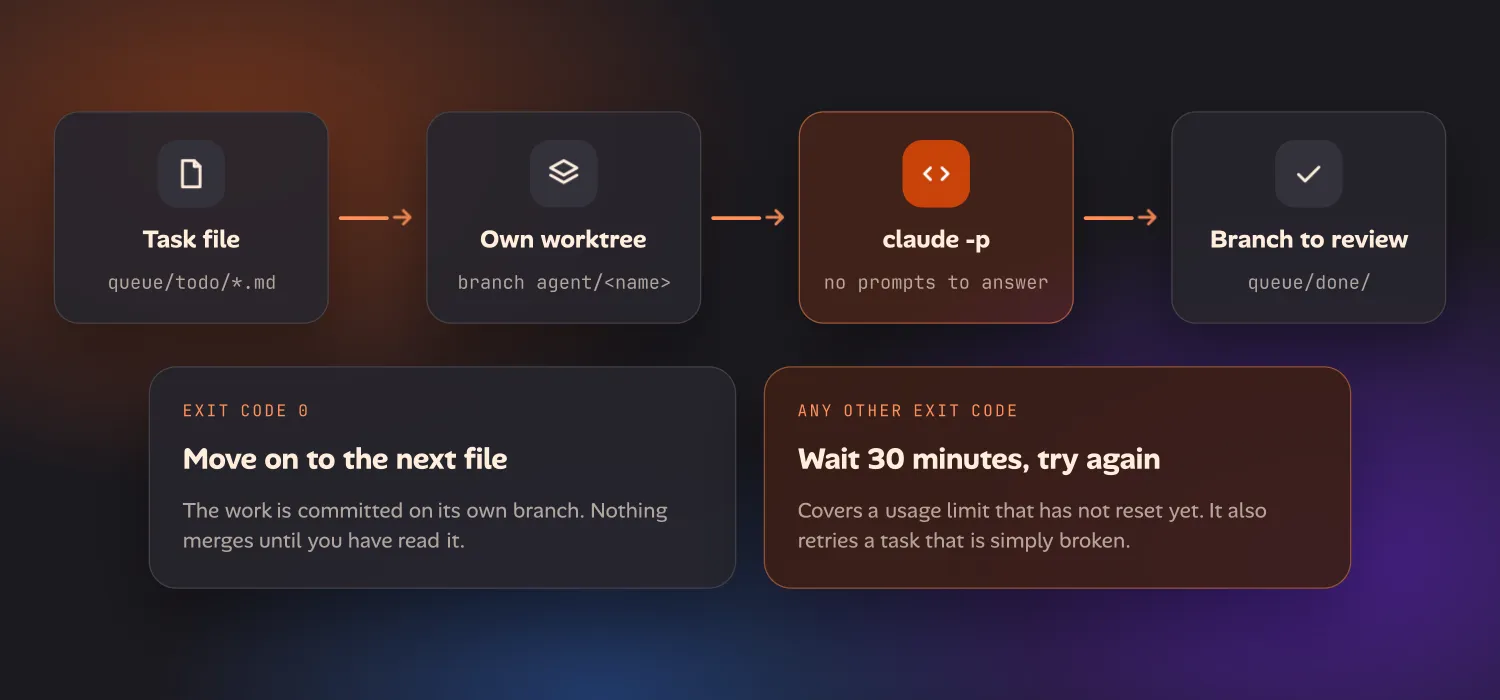
Write each task file as if for a contractor who can’t ask you anything: what to change, how to check it worked, and to commit when the tests pass. In the morning, read the logs and the branches, and merge what’s good.
Security: its own user, and only the folders it needs
An unattended agent runs commands on your machine with nobody watching. Treat it like a contractor with a key to one room.
- Give it its own macOS user. In System Settings → Users & Groups, add a Standard user, not an Administrator. Sign in to nothing else as that user: no iCloud, no mail, no browser profile. macOS already keeps one user’s Documents, Desktop and Library away from another standard user, so this one step puts your personal files out of reach.
- Limit the folders. Clone only the repositories the agent works on into that user’s home. If it needs a shared folder, share that one folder. Don’t run the agent as yourself “just for now”.
- Scope its credentials. A deploy key for one repository or a fine-grained token limited to a few. No cloud provider keys, no production database URL. If a task needs production access, that task isn’t one for an unattended run.
- Don’t use
--dangerously-skip-permissionson this machine. It’s the flag every tutorial reaches for, because it makes the prompts go away. An allowlist does the same job for the commands you expected and refuses the ones you didn’t. You can addpermissions.denyrules in the project’s.claude/settings.jsonfor paths it should never read. - Mind what it reads. An agent that fetches web pages or reads issues can be fed instructions by them. Keeping network tools off the allowlist for unattended runs removes most of that risk.
- Review before merge. Branches, not
main. If the repository deploys on push, the agent shouldn’t have push rights to the branch that deploys.
A separate user is not a sandbox. The agent can still use the network and anything that user can reach. For stronger isolation, run it in a container or a virtual machine and accept the extra upkeep.
What’s still missing
Build all of the above and you have a machine that works through a list overnight. Here is what you don’t have:
- A board. The queue is a folder. You can’t see what’s running, what’s waiting and why, or what failed, without reading logs over SSH.
- Parallel runs that stay out of each other’s way. The worker does one task at a time. Running three means three worktrees, three dev-server ports, a cap on concurrency and a way to tell which run owns which branch.
- Answers from your phone.
-pruns can’t ask a question. When a task hits a real decision, it either guesses or stops, and you find out in the morning. - Limits handled properly. The worker waits a fixed half hour and can’t tell a limit from a failure.
- Review and merge. Reading diffs and merging branches over SSH on a phone is possible and unpleasant.
You can build each of these. Plenty of people have, and the scripts are worth reading. It adds up to a small product that you then maintain.
How ion packages this
I ran a setup close to this one for a while, then kept adding to it until it became ion, the tool Oikou’s apps are built with. It runs on the same kind of machine and takes the same parts as given:
- A task board per project. A background runner picks up tasks assigned to the agent, up to three at once by default, each in its own git worktree on its own branch.
- A run that hits a usage limit is parked with the time the limit resets and goes back in the queue by itself. It isn’t counted as a failure.
- When an agent needs a decision, the question goes to one list you answer from your phone, and the run carries on with your answer.
- It installs itself as a launchd service on macOS, or a systemd one on Linux, and a setup wizard provisions the Cloudflare Tunnel and the Access policy in front of it.
- You review each branch and merge or discard it from the same place.
There is no public release of ion yet, and Oikou hasn’t launched. You can’t download either today. The developers page shows what ion does and where it stands, and there’s an early-access list on the home page. If you’re choosing hardware in the meantime, Oikou’s setup page has a short guide to picking a computer, and a Mac mini is the one I’d pick.
Until then, the setup above is real and it works: a Mac mini that stays awake, a service that restarts, a private way in, a token in one file, a folder of tasks, and an agent with a key to one room.
Questions
How do I run Claude Code 24/7 on a Mac mini at home?
Keep the Mac mini awake and set it to restart after a power failure, run Claude Code inside something that survives a disconnect (tmux for a session you attach to, or a launchd service for unattended runs), reach it over a private link such as Tailscale or Cloudflare Tunnel instead of opening ports, and give it a queue of work so it isn't idle waiting for you. Run it as its own macOS user with access to only the folders it needs.
Does Claude Code keep running when I close the terminal or my SSH session drops?
Not by itself. A Claude Code session started in a plain SSH shell ends when the connection does. Start it inside tmux and it keeps running after you detach, and you reattach later with tmux attach. tmux does not survive a reboot, so for runs that must come back after a restart, use a launchd service that runs claude -p.
How do I stop a Mac mini from sleeping so an agent can keep working?
In System Settings, open Energy and turn on "Prevent automatic sleeping when the display is off" and "Start up automatically after a power failure". The same two settings from a terminal are sudo pmset -a sleep 0 autorestart 1, and pmset -g shows what is in effect.
Do I need to open a port on my router to reach Claude Code from my phone?
No. Install Tailscale on the Mac mini and on your phone, turn on Remote Login on the Mac, and SSH to it over the private network. Nothing is forwarded on the router and nothing on the Mac listens to the open internet. Cloudflare Tunnel with Access in front is the alternative when you want a web address instead of SSH. Anthropic's Remote Control is a third option that needs no inbound connection at all.
What happens when an always-on Claude Code run hits its usage limit?
The run stops and Claude Code reports when the limit resets. Nothing resumes by itself. In a script, claude -p exits with a non-zero code, so a wrapper can wait and run the task again later. Interactively, you come back after the reset and continue the same conversation with claude --continue.
Is it safe to leave Claude Code running unattended?
It is as safe as the account it runs under. Create a separate standard macOS user for the agent, give it only the repositories it works on, use a deploy key or a fine-grained token scoped to those repositories, allow specific tools instead of skipping permission checks, and have it commit to branches you review rather than to main.